<?xml version="1.0" encoding="UTF-8"?>
<feed xmlns="http://www.w3.org/2005/Atom" xml:lang="en-gb">
<link rel="self" type="application/atom+xml" href="http://forum.robosavvy.com/feed.php?f=21" />

<title>RoboSavvy Forum</title>
<subtitle>Robosavvy Forum: The largest online community of Humanoid Robot Builders</subtitle>
<link href="http://forum.robosavvy.com/index.php" />
<updated>2017-06-11T14:33:54+01:00</updated>

<author><name><![CDATA[RoboSavvy Forum]]></name></author>
<id>http://forum.robosavvy.com/feed.php?f=21</id>
<entry>
<author><name><![CDATA[Marsman]]></name></author>
<updated>2017-06-11T14:33:54+01:00</updated>
<published>2017-06-11T14:33:54+01:00</published>
<id>http://forum.robosavvy.com/viewtopic.php?t=14245&amp;p=43745#p43745</id>
<link href="http://forum.robosavvy.com/viewtopic.php?t=14245&amp;p=43745#p43745"/>
<title type="html"><![CDATA[Electronic Brains and Sensors • GND or not GND ... that is my question]]></title>

<category term="Electronic Brains and Sensors" scheme="http://forum.robosavvy.com/viewforum.php?f=21" label="Electronic Brains and Sensors"/>
<content type="html" xml:base="http://forum.robosavvy.com/viewtopic.php?t=14245&amp;p=43745#p43745"><![CDATA[
Hi,<br /><br />I hope there are some smart electronic circuit designers among the reader who can help me (rookie) solve the following issue I'm having. I am using the L293D Motor-Driver ICs which require a logic supply voltage (VCC1: 5V) and a power supply voltage (VCC2: up to 36V). Since I realized that they draw some current when VCC2 is connected I thought it would be clever to supply VCC2 only once the motors are needed (similar to the 'enable' pin). Question is what do I do with the VCC2 pin when it is not connected to the power supply. Can I pull it to GND or shall I leave it open?<br />Selection_036.png<p>Statistics: Posted by <a href="http://forum.robosavvy.com/memberlist.php?mode=viewprofile&amp;u=1699">Marsman</a> — Sun Jun 11, 2017 2:33 pm</p><hr />
]]></content>
</entry>
<entry>
<author><name><![CDATA[neurobots]]></name></author>
<updated>2016-02-26T14:46:21+01:00</updated>
<published>2016-02-26T14:46:21+01:00</published>
<id>http://forum.robosavvy.com/viewtopic.php?t=14214&amp;p=43685#p43685</id>
<link href="http://forum.robosavvy.com/viewtopic.php?t=14214&amp;p=43685#p43685"/>
<title type="html"><![CDATA[Electronic Brains and Sensors • Jetduino: Smart servo control on the Jetson TK1]]></title>

<category term="Electronic Brains and Sensors" scheme="http://forum.robosavvy.com/viewforum.php?f=21" label="Electronic Brains and Sensors"/>
<content type="html" xml:base="http://forum.robosavvy.com/viewtopic.php?t=14214&amp;p=43685#p43685"><![CDATA[
<img src="http://neurorobotictech.com/Portals/0/BlogPosts/16_02_26_JetduinoSmartServos/SmartServosCover_Small.png" alt="Image" /><br /><br />I just posted a new video and blog showing how easy it is to control Dynamixel smart servos with the Jetson TK1 &amp; Jetduino. The Jetduino is a robotics interface board for the Jetson TK1 embedded supercomputer I am building. It makes it very easy to build robots that can use the parallel processing capabilites of the NVIDIA GPU for vision and neural networks.<br /><br />Blog Post with YouTube videos: <a href="http://neurorobotictech.com/Community/Blog/tabid/184/ID/32/Smart-servo-control-on-the-Jetson-TK1-with-Jetduino.aspx" class="postlink">http://neurorobotictech.com/Community/Blog/tabid/184/ID/32/Smart-servo-control-on-the-Jetson-TK1-with-Jetduino.aspx</a><br /><br />Newsletter: <a href="http://neurorobotictech.com/Community/Newsletter" class="postlink">http://neurorobotictech.com/Community/Newsletter</a><br /><br />Here are a couple of links describing the Jetduino:<br /><br />Jetduino V1 description: <a href="http://neurorobotictech.com/Community/Blog/tabid/184/ID/25/Jetduino-prototype-boards-ordered" class="postlink">http://neurorobotictech.com/Community/Blog/tabid/184/ID/25/Jetduino-prototype-boards-ordered</a><br /><br />Jetduino V1 test results: <a href="http://neurorobotictech.com/Community/Blog/tabid/184/ID/26/Jetduino-V01-Test-Results" class="postlink">http://neurorobotictech.com/Community/Blog/tabid/184/ID/26/Jetduino-V01-Test-Results</a><br /><br />Control 66 digital I/O lines: <a href="http://neurorobotictech.com/Community/Blog/tabid/184/ID/29/Jetduino-setup-and-digital-IO" class="postlink">http://neurorobotictech.com/Community/Blog/tabid/184/ID/29/Jetduino-setup-and-digital-IO</a><br /><br />Control 24 analog I/O lines:<a href="http://neurorobotictech.com/Community/Blog/tabid/184/ID/30/Jetduino-analog-IO" class="postlink">http://neurorobotictech.com/Community/Blog/tabid/184/ID/30/Jetduino-analog-IO</a><br /><br />Thanks<p>Statistics: Posted by <a href="http://forum.robosavvy.com/memberlist.php?mode=viewprofile&amp;u=8030">neurobots</a> — Fri Feb 26, 2016 2:46 pm</p><hr />
]]></content>
</entry>
<entry>
<author><name><![CDATA[neurobots]]></name></author>
<updated>2016-02-21T15:01:12+01:00</updated>
<published>2016-02-21T15:01:12+01:00</published>
<id>http://forum.robosavvy.com/viewtopic.php?t=14212&amp;p=43682#p43682</id>
<link href="http://forum.robosavvy.com/viewtopic.php?t=14212&amp;p=43682#p43682"/>
<title type="html"><![CDATA[Electronic Brains and Sensors • Jetduino: standard servo control on the Jetson TK1]]></title>

<category term="Electronic Brains and Sensors" scheme="http://forum.robosavvy.com/viewforum.php?f=21" label="Electronic Brains and Sensors"/>
<content type="html" xml:base="http://forum.robosavvy.com/viewtopic.php?t=14212&amp;p=43682#p43682"><![CDATA[
<img src="http://neurorobotictech.com/Portals/0/BlogPosts/16_02_21_StandardServo/JetduinoServos.png" alt="Image" /><br /><br />I just posted a new video and blog entry showing how easy it is to control up to 12 standard servos with the Jetson TK1 &amp; Jetduino. The Jetduino is a robotics interface board for the Jetson TK1 embedded supercomputer. It makes it very easy to build robots that can use the parallel processing capabilites of the NVIDIA GPU for vision and neural neural networks. If you would like to be kept up to date on the progress of this project please sign up for my newsletter. I plan to launch a crowdfunding campaign to get the Jetduino produced sometime in March or April, and I will need the help of any makers out there who want to make it easier to build robots or electronic projects with the awesome Jetson TK1. <br /><br />Blog Post with YouTube videos: <a href="http://neurorobotictech.com/Community/Blog/tabid/184/ID/31/Standard-servo-control-on-the-Jetson-TK1-with-Jetduino.aspx" class="postlink">http://neurorobotictech.com/Community/Blog/tabid/184/ID/31/Standard-servo-control-on-the-Jetson-TK1-with-Jetduino.aspx</a><br /><br />Newsletter: <a href="http://neurorobotictech.com/Community/Newsletter" class="postlink">http://neurorobotictech.com/Community/Newsletter</a><br /><br />Here are a couple of links describing the Jetduino:<br /><br />Jetduino V1 description: <a href="http://neurorobotictech.com/Community/Blog/tabid/184/ID/25/Jetduino-prototype-boards-ordered" class="postlink">http://neurorobotictech.com/Community/Blog/tabid/184/ID/25/Jetduino-prototype-boards-ordered</a><br /><br />Jetduino V1 test results: <a href="http://neurorobotictech.com/Community/Blog/tabid/184/ID/26/Jetduino-V01-Test-Results" class="postlink">http://neurorobotictech.com/Community/Blog/tabid/184/ID/26/Jetduino-V01-Test-Results</a><br /><br />Control 66 digital I/O lines: <a href="http://neurorobotictech.com/Community/Blog/tabid/184/ID/29/Jetduino-setup-and-digital-IO" class="postlink">http://neurorobotictech.com/Community/Blog/tabid/184/ID/29/Jetduino-setup-and-digital-IO</a><br /><br />Control 24 analog I/O lines:<a href="http://neurorobotictech.com/Community/Blog/tabid/184/ID/30/Jetduino-analog-IO" class="postlink">http://neurorobotictech.com/Community/Blog/tabid/184/ID/30/Jetduino-analog-IO</a><br /><br />Thanks<p>Statistics: Posted by <a href="http://forum.robosavvy.com/memberlist.php?mode=viewprofile&amp;u=8030">neurobots</a> — Sun Feb 21, 2016 3:01 pm</p><hr />
]]></content>
</entry>
<entry>
<author><name><![CDATA[neurobots]]></name></author>
<updated>2016-02-14T13:40:38+01:00</updated>
<published>2016-02-14T13:40:38+01:00</published>
<id>http://forum.robosavvy.com/viewtopic.php?t=14210&amp;p=43678#p43678</id>
<link href="http://forum.robosavvy.com/viewtopic.php?t=14210&amp;p=43678#p43678"/>
<title type="html"><![CDATA[Electronic Brains and Sensors • Jetduino: Robotics interface for NVIDIA Jetson TK1]]></title>

<category term="Electronic Brains and Sensors" scheme="http://forum.robosavvy.com/viewforum.php?f=21" label="Electronic Brains and Sensors"/>
<content type="html" xml:base="http://forum.robosavvy.com/viewtopic.php?t=14210&amp;p=43678#p43678"><![CDATA[
I have been working on a new interface board for the Jetson TK1 embedded supercomputer called the Jetduino. It makes it very easy to build robots that can use the parallel processing capabilites of the NVIDIA GPU for vision and neural neural networks.<br /><br /><img src="http://neurorobotictech.com//Portals/0/BlogPosts/16_02_13_JetduinoDigitalIO/Jetduino_SmallCombined.png" alt="Image" /><br /><br />The Jetduino mounts above the Jetson and has a small connector that fits in the 2mm J3A connectors. A Raspberry Pi GPIO ribbon cable then connects it to the Jetduino. It has mounting points for a 2.5&quot; HD, wireless antennas, a large proto-typing area, and a built-in shield for an Arduino Due. Just like the GrovePi for the Rapsberry Pi, you can use Python and C libraries to talk directly to the Arduino to set and receive digital and analog data. You can also control regular and smart servos. It has numerous Grove and RobotGeek connectors for modular sensors and motor actuators. I just put out a new blog post and two YouTube videos showing how to setup the Jetduino and perform digital I/O with 12 of the Jetson TK1 GPIO lines, and the 54 lines available on the Due. I am working on videos to show off the other features as well. If you would like to be notified when these are available please sign up for my newsletter. I plan to launch a crowdfunding campaign to get the Jetduino produced sometime in March or April, and I will need the help of any makers out there who want to make it easier to build robots or electronic projects with the awesome Jetson TK1. <br /><br />Blog Post with YouTube videos: <a href="http://neurorobotictech.com/Community/Blog/tabid/184/ID/29/Jetduino-setup-and-digital-IO" class="postlink">http://neurorobotictech.com/Community/Blog/tabid/184/ID/29/Jetduino-setup-and-digital-IO</a><br />Newsletter: <a href="http://neurorobotictech.com/Community/Newsletter" class="postlink">http://neurorobotictech.com/Community/Newsletter</a><br /><br />Here are a couple of links describing what the Jetduino is.<br />Jetduino V1 description: <a href="http://neurorobotictech.com/Community/Blog/tabid/184/ID/25/Jetduino-prototype-boards-ordered" class="postlink">http://neurorobotictech.com/Community/Blog/tabid/184/ID/25/Jetduino-prototype-boards-ordered</a><br />Jetduino V1 test results: <a href="http://neurorobotictech.com/Community/Blog/tabid/184/ID/26/Jetduino-V01-Test-Results" class="postlink">http://neurorobotictech.com/Community/Blog/tabid/184/ID/26/Jetduino-V01-Test-Results</a><br /><br />Thanks<p>Statistics: Posted by <a href="http://forum.robosavvy.com/memberlist.php?mode=viewprofile&amp;u=8030">neurobots</a> — Sun Feb 14, 2016 1:40 pm</p><hr />
]]></content>
</entry>
<entry>
<author><name><![CDATA[PaulL]]></name></author>
<updated>2015-03-31T11:27:34+01:00</updated>
<published>2015-03-31T11:27:34+01:00</published>
<id>http://forum.robosavvy.com/viewtopic.php?t=14152&amp;p=43525#p43525</id>
<link href="http://forum.robosavvy.com/viewtopic.php?t=14152&amp;p=43525#p43525"/>
<title type="html"><![CDATA[Electronic Brains and Sensors • Re: BeagleBone cape gives Quadcopter ROS realtime brain]]></title>

<category term="Electronic Brains and Sensors" scheme="http://forum.robosavvy.com/viewforum.php?f=21" label="Electronic Brains and Sensors"/>
<content type="html" xml:base="http://forum.robosavvy.com/viewtopic.php?t=14152&amp;p=43525#p43525"><![CDATA[
Dunno - that's kind of odd...<p>Statistics: Posted by <a href="http://forum.robosavvy.com/memberlist.php?mode=viewprofile&amp;u=741">PaulL</a> — Tue Mar 31, 2015 11:27 am</p><hr />
]]></content>
</entry>
<entry>
<author><name><![CDATA[limor]]></name></author>
<updated>2015-03-30T18:29:21+01:00</updated>
<published>2015-03-30T18:29:21+01:00</published>
<id>http://forum.robosavvy.com/viewtopic.php?t=14152&amp;p=43523#p43523</id>
<link href="http://forum.robosavvy.com/viewtopic.php?t=14152&amp;p=43523#p43523"/>
<title type="html"><![CDATA[Electronic Brains and Sensors • BeagleBone cape gives Quadcopter ROS realtime brain]]></title>

<category term="Electronic Brains and Sensors" scheme="http://forum.robosavvy.com/viewforum.php?f=21" label="Electronic Brains and Sensors"/>
<content type="html" xml:base="http://forum.robosavvy.com/viewtopic.php?t=14152&amp;p=43523#p43523"><![CDATA[
Launched on KickStarter, Spanish team launches the PixHawk Fire Cape targeting Linux based Quadcopter fans<br />Includes realtime Ubuntu distribution called Snappy<br /><br />The board comes with 3 IMUs no less:<br />MPU6000: 3-axis gyroscope, 3-axis accelerometer and temperature sensor.<br />MPU9250: 3-axis gyroscope, 3-axis accelerometer, 3-axis magnetometer and temperature sensor<br />LSM9DS0: 3-axis gyroscope, 3-axis accelerometer, 3-axis magnetometer and temperature sensor.<br />MS5611-01BA03: Barometer that includes pressure and temperature sensors. <br /><br />What can you do with 3 IMUs that you can't do with a simple $2 Inversense 6050 ?<br />I'm not quite sure but one of my personal interests is IMU odometry (double integration of acceleration. currently impractical due to dramatic accumulation of error). With 3 IMUs in sync maybe something new can be done ?<p>Statistics: Posted by <a href="http://forum.robosavvy.com/memberlist.php?mode=viewprofile&amp;u=2">limor</a> — Mon Mar 30, 2015 6:29 pm</p><hr />
]]></content>
</entry>
<entry>
<author><name><![CDATA[limor]]></name></author>
<updated>2014-06-03T07:53:24+01:00</updated>
<published>2014-06-03T07:53:24+01:00</published>
<id>http://forum.robosavvy.com/viewtopic.php?t=14017&amp;p=43244#p43244</id>
<link href="http://forum.robosavvy.com/viewtopic.php?t=14017&amp;p=43244#p43244"/>
<title type="html"><![CDATA[Electronic Brains and Sensors • Re: Machine Vision Module]]></title>

<category term="Electronic Brains and Sensors" scheme="http://forum.robosavvy.com/viewforum.php?f=21" label="Electronic Brains and Sensors"/>
<content type="html" xml:base="http://forum.robosavvy.com/viewtopic.php?t=14017&amp;p=43244#p43244"><![CDATA[
There is also the option of getting a miniature embedded android/linux, linking a webcam and running opencv.<br />Alternatively there's RoboRealm which offloads the processing to a remote Windows PC. The embedded linux only needs to send image frames over wifi.<br />It all depends on the image processing requirements<p>Statistics: Posted by <a href="http://forum.robosavvy.com/memberlist.php?mode=viewprofile&amp;u=2">limor</a> — Tue Jun 03, 2014 7:53 am</p><hr />
]]></content>
</entry>
<entry>
<author><name><![CDATA[nicolas gomez]]></name></author>
<updated>2014-04-15T17:37:34+01:00</updated>
<published>2014-04-15T17:37:34+01:00</published>
<id>http://forum.robosavvy.com/viewtopic.php?t=14017&amp;p=43192#p43192</id>
<link href="http://forum.robosavvy.com/viewtopic.php?t=14017&amp;p=43192#p43192"/>
<title type="html"><![CDATA[Electronic Brains and Sensors • Machine Vision Module]]></title>

<category term="Electronic Brains and Sensors" scheme="http://forum.robosavvy.com/viewforum.php?f=21" label="Electronic Brains and Sensors"/>
<content type="html" xml:base="http://forum.robosavvy.com/viewtopic.php?t=14017&amp;p=43192#p43192"><![CDATA[
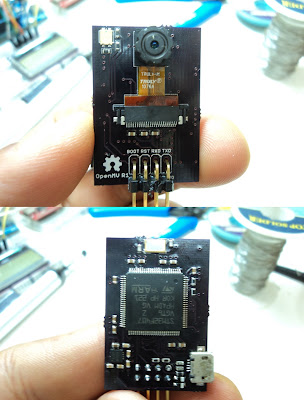
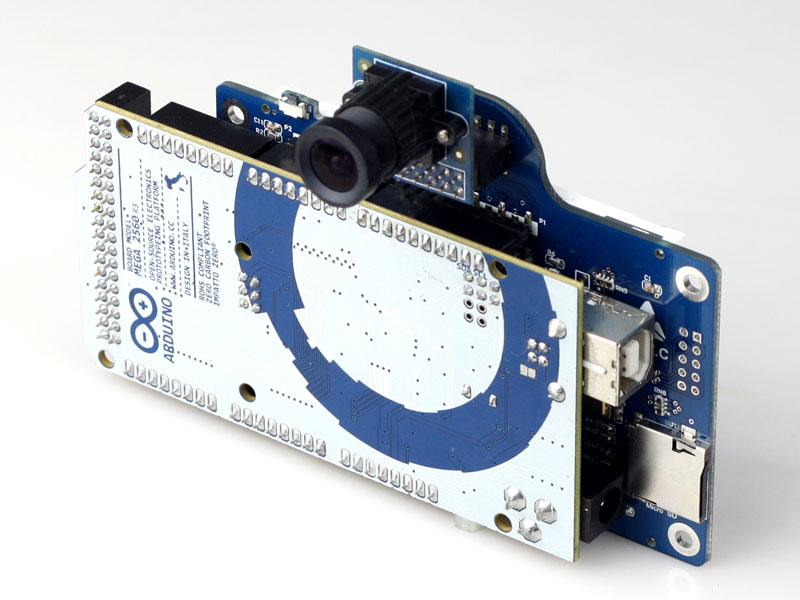
Hi all!! here find other options to vision mdule<br /><br /><span style="font-weight: bold">Pixy (CMUcam5)</span><br /><br /><img src="http://charmedlabs.com/default/wp-content/uploads/2013/09/pixy.jpg" alt="Image" /><br /><br /><a href="http://charmedlabs.com/default/?page_id=211" class="postlink">http://charmedlabs.com/default/?page_id=211</a><br /><br />preorder price  $69<br /><br />Technical specs<br /><br />    Processor: NXP  LPC4330, 204 MHz, dual core<br />    Image sensor: Omnivision OV9715, 1/4&quot;, 1280x800<br />    Lens field-of-view: 75 degrees horizontal, 47 degrees vertical<br />    Lens type: standard M12 (several different types available)<br />    Power consumption: 140 mA typical<br />    Power input: USB input (5V) or unregulated input (6V to 10V)<br />    RAM: 264K bytes<br />    Flash: 1M bytes<br />    Available data outputs: UART serial, SPI, I2C, USB, digital, analog<br />    Dimensions: 2.1&quot; x 1.75&quot; x 1.4&quot;<br /><br /><a href="https://www.youtube.com/watch?v=J8sl3nMlYxM" class="postlink">https://www.youtube.com/watch?v=J8sl3nMlYxM</a><br /><br /><a href="https://www.kickstarter.com/projects/254449872/pixy-cmucam5-a-fast-easy-to-use-vision-sensor/" class="postlink">https://www.kickstarter.com/projects/254449872/pixy-cmucam5-a-fast-easy-to-use-vision-sensor/</a><br /><br /><br /><span style="font-weight: bold">And there  a open source module</span><br /><br /><span style="font-weight: bold">OpenMV (Open Machine Vision Module)</span><br /><br />OpenMV is an open-source tiny machine vision module based on an STM32F4xx ARM Cortex-M4 MCU and an OV9650 sensor, it's currently capable of doing face detection at 25FPS, color tracking at 30FPS+ and has USART interfae and USB-OTG support for debugging and firmware update. This repo contains the hardware resources, drivers, image processing and userspace code.<br /><br /><img src="http://4.bp.blogspot.com/-hIU-_kyAp6o/UjYtQj9E9CI/AAAAAAAAASs/GK8z9rIqUP0/s400/openmv.jpeg" alt="Image" /><br /><br /><br /><a href="https://github.com/iabdalkader/openmv" class="postlink">https://github.com/iabdalkader/openmv</a><br /><br />Face Detection With OpenMV (25FPS) <br /><a href="http://www.youtube.com/watch?v=SdQF5JI4kzU" class="postlink">http://www.youtube.com/watch?v=SdQF5JI4kzU</a><br /><br />Color Tracking With OpenMV (30FPS) <br /><a href="http://www.youtube.com/watch?v=T-oMfnEsa1o" class="postlink">http://www.youtube.com/watch?v=T-oMfnEsa1o</a><br /><br />And for arduino users<br /><br /><span style="font-weight: bold">ArduCAM Shiled</span><br /><br /><img src="http://www.arducam.com/wp-content/uploads/2013/08/ArduCAM_REVC_MEGA_BACK.jpg" alt="Image" /><br /><br />    Incorporating standard SPI slave interface<br />    Reduced IOs consumption, only 4 IOs for SPI, 2 IOs for I2C and 1 IO for SD are required<br />    All IOs are 5V and 3.3V tolerant<br />    Support all Arduino families including Arduino DUE<br />    Can be easily ported to any platforms which have SPI port like Raspberry Pi, BeagleBoard, BeagleBone, pcDuino and etc<br />    Support 1080p still JPEG image capture<br />    Provide low power mode, reduce power consumption and prolong battery life<br />    Well mate with Arudino UNO R3, MEGA2560 R3, Leonardo R3 and DUE boards<br /><br />Can be easily ported to any platforms which have SPI port like Raspberry Pi, BeagleBoard, BeagleBone, pcDuino.<br /><br /><span style="font-weight: bold">ArduCAM Shield Demo</span><br /><br /><a href="http://www.uctronics.com/arduino-camera-shield-arducam-for-uno-mega2560-board-p-1445.html" class="postlink">http://www.uctronics.com/arduino-camera-shield-arducam-for-uno-mega2560-board-p-1445.html</a><br /><br /><a href="https://www.youtube.com/watch?v=gb5szs5-yMg#aid=P-jYuFhVB0w" class="postlink">https://www.youtube.com/watch?v=gb5szs5-yMg#aid=P-jYuFhVB0w</a><br /><br /><br /><a href="http://www.uctronics.com/arduino-camera-shield-arducam-for-uno-mega2560-board-p-1445.html" class="postlink">http://www.uctronics.com/arduino-camera-shield-arducam-for-uno-mega2560-board-p-1445.html</a><br />$29.99<p>Statistics: Posted by <a href="http://forum.robosavvy.com/memberlist.php?mode=viewprofile&amp;u=1610">nicolas gomez</a> — Tue Apr 15, 2014 5:37 pm</p><hr />
]]></content>
</entry>
<entry>
<author><name><![CDATA[nicolas gomez]]></name></author>
<updated>2014-04-15T17:15:07+01:00</updated>
<published>2014-04-15T17:15:07+01:00</published>
<id>http://forum.robosavvy.com/viewtopic.php?t=8002&amp;p=43191#p43191</id>
<link href="http://forum.robosavvy.com/viewtopic.php?t=8002&amp;p=43191#p43191"/>
<title type="html"><![CDATA[Electronic Brains and Sensors • Re: new chinese gumstix competitor 74 USD AllWinner A10 Andr]]></title>

<category term="Electronic Brains and Sensors" scheme="http://forum.robosavvy.com/viewforum.php?f=21" label="Electronic Brains and Sensors"/>
<content type="html" xml:base="http://forum.robosavvy.com/viewtopic.php?t=8002&amp;p=43191#p43191"><![CDATA[
HIi all!!<br />here tha last update.<br /><br />A80 OptimusBoard - AllWinner Octa-Core , SoC – AllWinner Ultra Core A80<br /><br />CPU  <br />  4x Cortex 15, 4x Cortex A7 At  2.0Ghz <br /> <br />GPU  <br /> Imagination Technologies PowerVR GPU  64-core G623 <br /><br />    System Memory – 2GB DDR3 <br />    Storage – 8GB NAND Flash <br />    Video Output – HDMI 1.4a <br />    Connectivity – Dual band Wi-Fi 802.11 b/g/n, Bluetooth 4.0, and Ethernet (GMAC) <br />    1x USB 3.0 OTG HIC  <br />    2x USB 2.0 host ports <br />    Audio codec – AC100 Codec <br /><br /> Camera <br />      Camera I/F – 12MP MIPI CSI <br />      Integrated parallel and MIPI I/F sensor <br />      Supports 5M/8M/12M/16M CMOS sensor <br />      Supports 8/10/12-bit YUV/Bayer sensor <br /> <br />      Debugging – UART and JTAG <br />      Expansion – 32-pin GPIO header <br />      Misc – IR receiver, reset and power LEDs. <br />      Power management – AXP806, AXP809 <br />      Power Supply – DC IN (5V), and battery <br /><br />Size – 135x70mm <br />be available in May-June for less than $100.<br />Here a video  <br /><a href="https://www.youtube.com/watch?v=et0tUD_mL0E" class="postlink">https://www.youtube.com/watch?v=et0tUD_mL0E</a><br /><br /><a href="http://www.allwinnertech.com/en/developer/board/" class="postlink">http://www.allwinnertech.com/en/developer/board/</a><br /><br /><br /><img src="https://forum.poppy-project.org/uploads/default/_optimized/aca/48b/2877159244_623x500.jpg" alt="Image" /><br /><br />Allwinner A80, with USB3.0 support (faster transfer and charging), Allwinner A80 Optimus Board, 4K H265 Encode and Decode in real-time, talking performance/power advantage over competition, 64-core G6230 GPU, Allwinner for car safety.<br />Support Opencl 1.X,Opengl 3.x, Direct 3D, Renderscript.<br /><br />Here a more complete review about Dev-boards - GPUs - mini pc-  SoM modules<br /><a href="https://forum.poppy-project.org/t/vision-system-for-poppy/92/5?u=niko2009" class="postlink">https://forum.poppy-project.org/t/vision-system-for-poppy/92/5?u=niko2009</a><p>Statistics: Posted by <a href="http://forum.robosavvy.com/memberlist.php?mode=viewprofile&amp;u=1610">nicolas gomez</a> — Tue Apr 15, 2014 5:15 pm</p><hr />
]]></content>
</entry>
<entry>
<author><name><![CDATA[xainnasir]]></name></author>
<updated>2014-02-03T00:52:49+01:00</updated>
<published>2014-02-03T00:52:49+01:00</published>
<id>http://forum.robosavvy.com/viewtopic.php?t=7178&amp;p=43084#p43084</id>
<link href="http://forum.robosavvy.com/viewtopic.php?t=7178&amp;p=43084#p43084"/>
<title type="html"><![CDATA[Electronic Brains and Sensors • Re: New EasyVR Voice Recognition Module now in Stock]]></title>

<category term="Electronic Brains and Sensors" scheme="http://forum.robosavvy.com/viewforum.php?f=21" label="Electronic Brains and Sensors"/>
<content type="html" xml:base="http://forum.robosavvy.com/viewtopic.php?t=7178&amp;p=43084#p43084"><![CDATA[
Hello,<br /><br />Its not much difficult to connect easyvr with arduino uno ..... Check out this example .... <!-- m --><a class="postlink" href="http://www.theengineeringprojects.com/2013/04/interfacing-of-easyvr-shield-with.html">http://www.theengineeringprojects.com/2 ... -with.html</a><!-- m --> .... They have explained this thing very clearly and in full detail .... I think it will help you out. They are very thorough. Still having problems ask here and I will reply.<br /><br />Thanks.<p>Statistics: Posted by <a href="http://forum.robosavvy.com/memberlist.php?mode=viewprofile&amp;u=7725">xainnasir</a> — Mon Feb 03, 2014 12:52 am</p><hr />
]]></content>
</entry>
<entry>
<author><name><![CDATA[kasierchiefs]]></name></author>
<updated>2013-10-25T05:40:25+01:00</updated>
<published>2013-10-25T05:40:25+01:00</published>
<id>http://forum.robosavvy.com/viewtopic.php?t=8002&amp;p=42792#p42792</id>
<link href="http://forum.robosavvy.com/viewtopic.php?t=8002&amp;p=42792#p42792"/>
<title type="html"><![CDATA[Electronic Brains and Sensors • Re: new chinese gumstix competitor 74 USD AllWinner A10 Andr]]></title>

<category term="Electronic Brains and Sensors" scheme="http://forum.robosavvy.com/viewforum.php?f=21" label="Electronic Brains and Sensors"/>
<content type="html" xml:base="http://forum.robosavvy.com/viewtopic.php?t=8002&amp;p=42792#p42792"><![CDATA[
Hi! It is kind of a late comment, but has it been an update lately? I'm interested but I´m not sure if it has already been upgraded.<p>Statistics: Posted by <a href="http://forum.robosavvy.com/memberlist.php?mode=viewprofile&amp;u=7581">kasierchiefs</a> — Fri Oct 25, 2013 5:40 am</p><hr />
]]></content>
</entry>
<entry>
<author><name><![CDATA[nepotech]]></name></author>
<updated>2013-09-24T06:15:37+01:00</updated>
<published>2013-09-24T06:15:37+01:00</published>
<id>http://forum.robosavvy.com/viewtopic.php?t=10134&amp;p=39270#p39270</id>
<link href="http://forum.robosavvy.com/viewtopic.php?t=10134&amp;p=39270#p39270"/>
<title type="html"><![CDATA[Electronic Brains and Sensors • Re: Zig2serial Problem]]></title>

<category term="Electronic Brains and Sensors" scheme="http://forum.robosavvy.com/viewforum.php?f=21" label="Electronic Brains and Sensors"/>
<content type="html" xml:base="http://forum.robosavvy.com/viewtopic.php?t=10134&amp;p=39270#p39270"><![CDATA[
Thanks for your reply siempre.<br /><br />I have read data from zig2serial using c#.  i found my problem. the problem is switch usb2dinamyxel (rs232 switch) is bad contact. i repair it, and i found my solution.<p>Statistics: Posted by <a href="http://forum.robosavvy.com/memberlist.php?mode=viewprofile&amp;u=2713">nepotech</a> — Tue Sep 24, 2013 6:15 am</p><hr />
]]></content>
</entry>
<entry>
<author><name><![CDATA[siempre.aprendiendo]]></name></author>
<updated>2013-09-23T09:59:42+01:00</updated>
<published>2013-09-23T09:59:42+01:00</published>
<id>http://forum.robosavvy.com/viewtopic.php?t=10134&amp;p=39042#p39042</id>
<link href="http://forum.robosavvy.com/viewtopic.php?t=10134&amp;p=39042#p39042"/>
<title type="html"><![CDATA[Electronic Brains and Sensors • Re: Zig2serial Problem]]></title>

<category term="Electronic Brains and Sensors" scheme="http://forum.robosavvy.com/viewforum.php?f=21" label="Electronic Brains and Sensors"/>
<content type="html" xml:base="http://forum.robosavvy.com/viewtopic.php?t=10134&amp;p=39042#p39042"><![CDATA[
Do you receive absolutely nothing?<br />There is no data to read? (serialPort.BytesToRead)<br /><br />The divide and conquer tactic, <br />- create the most simple PC program to receive data, so you are sending data correctly (CM-5xx-&gt;PC Test code)<br />- cerate the most simple CM-5xx program to send data, testing that you are receiving data correctly (CM-5xx Test code-&gt;PC)<br /><br />- If all works you could continue adding code step to step until it fails or your initial program works. <br />- If all fails, probably you should learn a little more about it, search articles, books, tutorials, examples... you may find some help at <!-- m --><a class="postlink" href="http://softwaresouls.com/softwaresouls/tag/serial-port/">http://softwaresouls.com/softwaresouls/tag/serial-port/</a><!-- m --><br />- If a part fails you can focus in that part to find and fix the problem<br /><br />Hope it helps <img src="http://forum.robosavvy.com/images/smilies/icon_smile.gif" alt=":)" title="Smile" /><p>Statistics: Posted by <a href="http://forum.robosavvy.com/memberlist.php?mode=viewprofile&amp;u=698">siempre.aprendiendo</a> — Mon Sep 23, 2013 9:59 am</p><hr />
]]></content>
</entry>
<entry>
<author><name><![CDATA[nepotech]]></name></author>
<updated>2013-09-23T04:49:25+01:00</updated>
<published>2013-09-23T04:49:25+01:00</published>
<id>http://forum.robosavvy.com/viewtopic.php?t=10134&amp;p=38952#p38952</id>
<link href="http://forum.robosavvy.com/viewtopic.php?t=10134&amp;p=38952#p38952"/>
<title type="html"><![CDATA[Electronic Brains and Sensors • Zig2serial Problem]]></title>

<category term="Electronic Brains and Sensors" scheme="http://forum.robosavvy.com/viewforum.php?f=21" label="Electronic Brains and Sensors"/>
<content type="html" xml:base="http://forum.robosavvy.com/viewtopic.php?t=10134&amp;p=38952#p38952"><![CDATA[
Hi All,<br /><br />I have zig2serial,zig100 and zig110. I connect the zig110 to atmega16, ang zig100+zig2serial in PC.<br />I sending a data from zig110 to zig100+zig2serial. I see the indicator RX in zig2serial is blink, <span style="font-weight: bold">but i can't read the data <br />from my computer.</span> I using C# code program to reading zig2serial data.<br /><br />Any solution for this problem?<br />Please help me.<br /><br />Thanks for all.<p>Statistics: Posted by <a href="http://forum.robosavvy.com/memberlist.php?mode=viewprofile&amp;u=2713">nepotech</a> — Mon Sep 23, 2013 4:49 am</p><hr />
]]></content>
</entry>
<entry>
<author><name><![CDATA[PaulL]]></name></author>
<updated>2013-09-08T13:00:44+01:00</updated>
<published>2013-09-08T13:00:44+01:00</published>
<id>http://forum.robosavvy.com/viewtopic.php?t=9762&amp;p=38548#p38548</id>
<link href="http://forum.robosavvy.com/viewtopic.php?t=9762&amp;p=38548#p38548"/>
<title type="html"><![CDATA[Electronic Brains and Sensors • Brain Power - DC to DC Converter...]]></title>

<category term="Electronic Brains and Sensors" scheme="http://forum.robosavvy.com/viewforum.php?f=21" label="Electronic Brains and Sensors"/>
<content type="html" xml:base="http://forum.robosavvy.com/viewtopic.php?t=9762&amp;p=38548#p38548"><![CDATA[
I found and bought a couple of these, Naos Raptor series:<br /><br /><a href="http://www.digikey.com/product-detail/en/NSR020A0X43Z/555-1139-ND/1964566" class="postlink">http://www.digikey.com/product-detail/en/NSR020A0X43Z/555-1139-ND/1964566</a><br /><br />They're rated at 20 amps, very efficient and compact for their rating.<br /><br />I'll use this to feed 5v to my Kontron PicoITX 1.6 Ghz board.<br /><br />I'd like to power the PC board AND the hands (MKS DS-450 servos require 5v, won't take more!) from one of these, but I won't know if that's going to work until I test it (noise, etc).<br /><br />On that same note, I found that BatchPCB (Sparkfun's board service) went defunct and customers are being pointed to OSHPark.com - seems to be a better, faster service. I'm probably going to end up making a custom controller board to host an STM32F103CBT, PWM connections, a PCA9685, gyro / accelerometer, a stereo audio amp, and one or two of these DC to DC converters - and probably a few connections for some sensors. The nice thing about OSH Park is they'll take a .brd file from Eagle - doesn't get any simpler than that.<br /><br />I've got about all of the components I'd want as separate boards, but I'm doubtful that I could get it all to fit in the space I have available on my revised torso design. I can pack things in tighter with a custom design. <img src="http://forum.robosavvy.com/images/smilies/icon_wink.gif" alt=";)" title="Wink" /><p>Statistics: Posted by <a href="http://forum.robosavvy.com/memberlist.php?mode=viewprofile&amp;u=741">PaulL</a> — Sun Sep 08, 2013 1:00 pm</p><hr />
]]></content>
</entry>
</feed>