<?xml version="1.0" encoding="UTF-8"?>
<feed xmlns="http://www.w3.org/2005/Atom" xml:lang="en-gb">
<link rel="self" type="application/atom+xml" href="http://forum.robosavvy.com/feed.php?f=21&amp;t=7178" />

<title>RoboSavvy Forum</title>
<subtitle>Robosavvy Forum: The largest online community of Humanoid Robot Builders</subtitle>
<link href="http://forum.robosavvy.com/index.php" />
<updated>2014-02-03T00:52:49+01:00</updated>

<author><name><![CDATA[RoboSavvy Forum]]></name></author>
<id>http://forum.robosavvy.com/feed.php?f=21&amp;t=7178</id>
<entry>
<author><name><![CDATA[xainnasir]]></name></author>
<updated>2014-02-03T00:52:49+01:00</updated>
<published>2014-02-03T00:52:49+01:00</published>
<id>http://forum.robosavvy.com/viewtopic.php?t=7178&amp;p=43084#p43084</id>
<link href="http://forum.robosavvy.com/viewtopic.php?t=7178&amp;p=43084#p43084"/>
<title type="html"><![CDATA[Re: New EasyVR Voice Recognition Module now in Stock]]></title>

<content type="html" xml:base="http://forum.robosavvy.com/viewtopic.php?t=7178&amp;p=43084#p43084"><![CDATA[
Hello,<br /><br />Its not much difficult to connect easyvr with arduino uno ..... Check out this example .... <!-- m --><a class="postlink" href="http://www.theengineeringprojects.com/2013/04/interfacing-of-easyvr-shield-with.html">http://www.theengineeringprojects.com/2 ... -with.html</a><!-- m --> .... They have explained this thing very clearly and in full detail .... I think it will help you out. They are very thorough. Still having problems ask here and I will reply.<br /><br />Thanks.<p>Statistics: Posted by <a href="http://forum.robosavvy.com/memberlist.php?mode=viewprofile&amp;u=7725">xainnasir</a> — Mon Feb 03, 2014 12:52 am</p><hr />
]]></content>
</entry>
<entry>
<author><name><![CDATA[PedroR]]></name></author>
<updated>2011-05-03T10:16:51+01:00</updated>
<published>2011-05-03T10:16:51+01:00</published>
<id>http://forum.robosavvy.com/viewtopic.php?t=7178&amp;p=31051#p31051</id>
<link href="http://forum.robosavvy.com/viewtopic.php?t=7178&amp;p=31051#p31051"/>
<title type="html"><![CDATA[New EasyVR Voice Recognition Module now in Stock]]></title>

<content type="html" xml:base="http://forum.robosavvy.com/viewtopic.php?t=7178&amp;p=31051#p31051"><![CDATA[
Hi Thanis79<br /><br />Unfortunately you can't connect easyVR directly to Bioloid.<br /><br />The reason is that EasyVR communicates over Serial TTL and you need to send and be able to receive data over the serial port.<br /><br />The standard Bioloid Firmware (with Roboplus Task) does not support this because all the COMM ports are reserved (one is for Dynamixel and the other for PC/Zigbee communication).<br /><br />There is a way to interface VRbot with Bioloid but it requires an intermediate board (such as an Arduino):<br />1) Get an Arduino Pro Mini (5V)  and connect the VRbot to the Arduino COMM port.<br /><br />2) Connect one of the Analog Output pins to a CM510 sensor port. Program the Arduino to set the Analog pin at different levels depending on the commands you receive from VRbot.<br /><br />The role of the Arduino here would be to communicate with VRbot over the Serial protocol and translate the Speech Recognition results into Analog Signal levels that you can read using Roboplus Task.<br /><br />The CM510 sensor ports provide you everything you need: 5V and GND to power the Arduino and and Analog PIN to receive the results from the Arduino.<br /><br />If you need help with this project please let us know. There is basic sample code to get you started with EasyVR and Arduino Mini here <!-- m --><a class="postlink" href="http://veear.eu/Support/Downloads.aspx">http://veear.eu/Support/Downloads.aspx</a><!-- m --> (the sample is under VRbot samples but EasyVR is backwards compatible with VRbot so you can safely use those samples)<br /><br />Regards<br />Pedro.<p>Statistics: Posted by <a href="http://forum.robosavvy.com/memberlist.php?mode=viewprofile&amp;u=1061">PedroR</a> — Tue May 03, 2011 10:16 am</p><hr />
]]></content>
</entry>
<entry>
<author><name><![CDATA[thanos79]]></name></author>
<updated>2011-05-03T05:37:54+01:00</updated>
<published>2011-05-03T05:37:54+01:00</published>
<id>http://forum.robosavvy.com/viewtopic.php?t=7178&amp;p=31049#p31049</id>
<link href="http://forum.robosavvy.com/viewtopic.php?t=7178&amp;p=31049#p31049"/>
<title type="html"><![CDATA[New EasyVR Voice Recognition Module]]></title>

<content type="html" xml:base="http://forum.robosavvy.com/viewtopic.php?t=7178&amp;p=31049#p31049"><![CDATA[
Hi PedroR.<br /><br />it can be connected the new EasyVR Voice Recognition &#964;&#959; CM 510 controller ???<br /> <img src="http://forum.robosavvy.com/images/smilies/icon_exclaim.gif" alt=":!:" title="Exclamation" /><p>Statistics: Posted by <a href="http://forum.robosavvy.com/memberlist.php?mode=viewprofile&amp;u=2008">thanos79</a> — Tue May 03, 2011 5:37 am</p><hr />
]]></content>
</entry>
<entry>
<author><name><![CDATA[PedroR]]></name></author>
<updated>2011-05-02T11:25:43+01:00</updated>
<published>2011-05-02T11:25:43+01:00</published>
<id>http://forum.robosavvy.com/viewtopic.php?t=7178&amp;p=31041#p31041</id>
<link href="http://forum.robosavvy.com/viewtopic.php?t=7178&amp;p=31041#p31041"/>
<title type="html"><![CDATA[New EasyVR Voice Recognition Module now in Stock]]></title>

<content type="html" xml:base="http://forum.robosavvy.com/viewtopic.php?t=7178&amp;p=31041#p31041"><![CDATA[
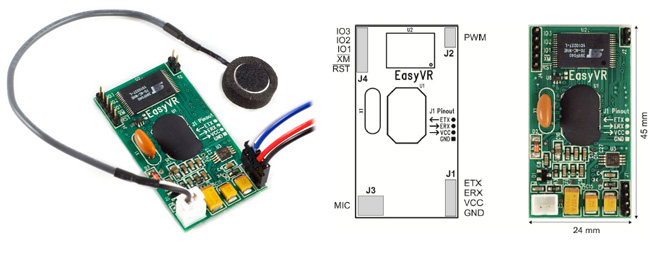
Hi all<br /><br />We've got the new <a href="http://robosavvy.com/store/product_info.php?products_id=1577" class="postlink">EasyVR Voice Recognition</a> module now in stock.<br /><br />This module is the <span style="color: green">successor of VRbot </span>and is a convenient (and fairly inexpensive way) of adding Voice Recognition capabilities to any project.<br /><br />The module <span style="color: green">connects to the host MCU via TTL Serial (it is 3.3 - 5V tolerant) and uses a simple protocol to signal whenever a command is received.</span><br /><br /><img src="http://robosavvy.com/RoboSavvyPages/EasyVR/EasyVR_Store_Composition.jpg" alt="Image" /><br /><br /><span style="font-weight: bold">What's new about EasyVR is:</span><br />  - It now adds Sound Output capibility (simply connect an 8 Ohm speaker) and 3 GPIO lines, all controllable by the Serial Protocol.<br /><br />  - Two new Speech Independant languages are also supported (Spanish and French) <br />    You can also record your own Custom Commands using the freeware GUI tool included.<br /><br /><br />Here is a sample Video using Robonova:<br /><div class='bbmedia' data-url='http://www.youtube.com/watch?v=Yb59SjCmsj0?fs=1&amp;hl=pt_BR' style='margin: 1px; display: inline-block; vertical-align: bottom;'><div style='width: 200px; height: 40px; border: 1px solid #999; display: table-cell; text-align: center; vertical-align: middle; font: 10px/10px Verdana; color: #555; opacity: 0.5;'><a style='color: #105289; text-decoration: none;' href='http://phpbbex.com/' target='_blank'>phpBB</a> &#91;media&#93;</div><script>if (typeof bbmedia == 'undefined') { bbmedia = true; var e = document.createElement('script'); e.async = true; e.src = 'js/bbmedia.js'; var s = document.getElementsByTagName('script')[0]; s.parentNode.insertBefore(e, s); }</script></div><br /><br />The module is <span style="color: green">compatible with Virtually any micro controller </span>as long as it hast a UART at TTL level.<br /><br />The interesting bit about this is that it's completelly self contained: all speech recognition processing is done onboard (quite a small board btw) and the Host MCU only receives signals with the voice commands that are recognized.<br /><br /><br />The product is in store here <!-- m --><a class="postlink" href="http://robosavvy.com/store/product_info.php?products_id=1577">http://robosavvy.com/store/product_info ... ts_id=1577</a><!-- m --> and retails for 35 GBP (42 GBP inc VAT)<p>Statistics: Posted by <a href="http://forum.robosavvy.com/memberlist.php?mode=viewprofile&amp;u=1061">PedroR</a> — Mon May 02, 2011 11:25 am</p><hr />
]]></content>
</entry>
</feed>