<?xml version="1.0" encoding="UTF-8"?>
<feed xmlns="http://www.w3.org/2005/Atom" xml:lang="en-gb">
<link rel="self" type="application/atom+xml" href="http://forum.robosavvy.com/feed.php?f=4&amp;t=220" />

<title>RoboSavvy Forum</title>
<subtitle>Robosavvy Forum: The largest online community of Humanoid Robot Builders</subtitle>
<link href="http://forum.robosavvy.com/index.php" />
<updated>2009-11-17T21:11:53+01:00</updated>

<author><name><![CDATA[RoboSavvy Forum]]></name></author>
<id>http://forum.robosavvy.com/feed.php?f=4&amp;t=220</id>
<entry>
<author><name><![CDATA[ztech]]></name></author>
<updated>2009-11-17T21:11:53+01:00</updated>
<published>2009-11-17T21:11:53+01:00</published>
<id>http://forum.robosavvy.com/viewtopic.php?t=220&amp;p=22818#p22818</id>
<link href="http://forum.robosavvy.com/viewtopic.php?t=220&amp;p=22818#p22818"/>
<title type="html"><![CDATA[RN1- 3024 Diagram's for Add-Ons - Please STICKY!]]></title>

<content type="html" xml:base="http://forum.robosavvy.com/viewtopic.php?t=220&amp;p=22818#p22818"><![CDATA[
finally got my sensors working.  <img src="http://forum.robosavvy.com/images/smilies/icon_biggrin.gif" alt=":D" title="Very Happy" /> <br /><br />if anybody want´s to know how to do, feel free to write me.<br /><br />tom<p>Statistics: Posted by <a href="http://forum.robosavvy.com/memberlist.php?mode=viewprofile&amp;u=1773">ztech</a> — Tue Nov 17, 2009 9:11 pm</p><hr />
]]></content>
</entry>
<entry>
<author><name><![CDATA[ztech]]></name></author>
<updated>2009-11-15T01:04:18+01:00</updated>
<published>2009-11-15T01:04:18+01:00</published>
<id>http://forum.robosavvy.com/viewtopic.php?t=220&amp;p=22781#p22781</id>
<link href="http://forum.robosavvy.com/viewtopic.php?t=220&amp;p=22781#p22781"/>
<title type="html"><![CDATA[RN1- 3024 Diagram's for Add-Ons - Please STICKY!]]></title>

<content type="html" xml:base="http://forum.robosavvy.com/viewtopic.php?t=220&amp;p=22781#p22781"><![CDATA[
thank´s a lot, works well with both gyro´s!!! that makes fun! <img src="http://forum.robosavvy.com/images/smilies/icon_biggrin.gif" alt=":D" title="Very Happy" /> <br /><br />i´m wondering if anybody could help me with some ir-sensors?! <img src="http://forum.robosavvy.com/images/smilies/icon_rolleyes.gif" alt=":roll:" title="Rolling Eyes" /><br />...<br />where do i have to connect them (maybe port 6,7,...; i already installed two gyro´s at port 0,1,4,5) and how can i set a value in my programm (the sensors give a digital signal -&gt; 0/1).<br />possible ports and a short program code would be nice... please!<br /><br />thank´s<br /><br />tom<p>Statistics: Posted by <a href="http://forum.robosavvy.com/memberlist.php?mode=viewprofile&amp;u=1773">ztech</a> — Sun Nov 15, 2009 1:04 am</p><hr />
]]></content>
</entry>
<entry>
<author><name><![CDATA[cobracon]]></name></author>
<updated>2007-06-05T23:34:31+01:00</updated>
<published>2007-06-05T23:34:31+01:00</published>
<id>http://forum.robosavvy.com/viewtopic.php?t=220&amp;p=9361#p9361</id>
<link href="http://forum.robosavvy.com/viewtopic.php?t=220&amp;p=9361#p9361"/>
<title type="html"><![CDATA[RN1- 3024 Diagram's for Add-Ons - Please STICKY!]]></title>

<content type="html" xml:base="http://forum.robosavvy.com/viewtopic.php?t=220&amp;p=9361#p9361"><![CDATA[
Great diagrams guys. This sure helps us newbies out alot. This topic should be stickied.<p>Statistics: Posted by <a href="http://forum.robosavvy.com/memberlist.php?mode=viewprofile&amp;u=577">cobracon</a> — Tue Jun 05, 2007 11:34 pm</p><hr />
]]></content>
</entry>
<entry>
<author><name><![CDATA[Pev]]></name></author>
<updated>2007-06-05T07:22:19+01:00</updated>
<published>2007-06-05T07:22:19+01:00</published>
<id>http://forum.robosavvy.com/viewtopic.php?t=220&amp;p=9353#p9353</id>
<link href="http://forum.robosavvy.com/viewtopic.php?t=220&amp;p=9353#p9353"/>
<title type="html"><![CDATA[RN1- 3024 Diagram's for Add-Ons - Please STICKY!]]></title>

<content type="html" xml:base="http://forum.robosavvy.com/viewtopic.php?t=220&amp;p=9353#p9353"><![CDATA[
<blockquote><div><cite>MacPro7GB wrote:</cite><br />I can link the bluesmirf module with my PC but I cannot get it to communicate with the robot.<br /></div></blockquote><br /><br />Had a quick look at thge code and the TX is set to 9600 so I think that is probably okay. The ETX and ERX labelling on the MR-C3024 can be a bit confussing with you needing to connect the Bluesmirf TX to ETX and Bluesmirf RX to ERX I think - anyway it was the opposite way round to the way I thought so you may want to try swapping the TX and RX lines<br /><br />Pev<p>Statistics: Posted by <a href="http://forum.robosavvy.com/memberlist.php?mode=viewprofile&amp;u=88">Pev</a> — Tue Jun 05, 2007 7:22 am</p><hr />
]]></content>
</entry>
<entry>
<author><name><![CDATA[limor]]></name></author>
<updated>2007-06-05T00:03:03+01:00</updated>
<published>2007-06-05T00:03:03+01:00</published>
<id>http://forum.robosavvy.com/viewtopic.php?t=220&amp;p=9351#p9351</id>
<link href="http://forum.robosavvy.com/viewtopic.php?t=220&amp;p=9351#p9351"/>
<title type="html"><![CDATA[RN1- 3024 Diagram's for Add-Ons - Please STICKY!]]></title>

<content type="html" xml:base="http://forum.robosavvy.com/viewtopic.php?t=220&amp;p=9351#p9351"><![CDATA[
<blockquote><div><cite>MacPro7GB wrote:</cite><br />I can link the bluesmirf module with my PC but I cannot get it to communicate with the robot.<br /></div></blockquote><br />Bluesmirf is set to communicate with Rx/Tx at 9600bps by default. You may need to issue the right ATSW20... command to change the baud rate. see Bluesmirf documentation.<p>Statistics: Posted by <a href="http://forum.robosavvy.com/memberlist.php?mode=viewprofile&amp;u=2">limor</a> — Tue Jun 05, 2007 12:03 am</p><hr />
]]></content>
</entry>
<entry>
<author><name><![CDATA[MacPro7GB]]></name></author>
<updated>2007-06-04T20:54:44+01:00</updated>
<published>2007-06-04T20:54:44+01:00</published>
<id>http://forum.robosavvy.com/viewtopic.php?t=220&amp;p=9348#p9348</id>
<link href="http://forum.robosavvy.com/viewtopic.php?t=220&amp;p=9348#p9348"/>
<title type="html"><![CDATA[RN1- 3024 Diagram's for Add-Ons - Please STICKY!]]></title>

<content type="html" xml:base="http://forum.robosavvy.com/viewtopic.php?t=220&amp;p=9348#p9348"><![CDATA[
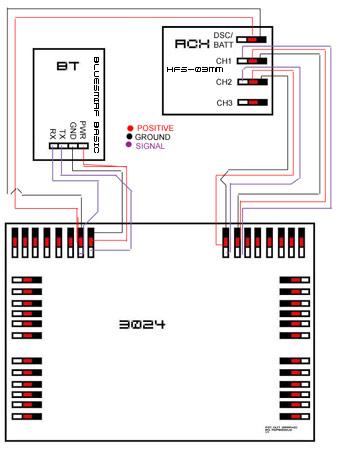
I got both of my gyros working but I am having a problem with my accelerometer and bluetooth.  I can link the bluesmirf module with my PC but I cannot get it to communicate with the robot.  I also do not seem to be able to get the accelerometer working.<br /><br />I am pretty sure it is in my code.  I have the BT hooked up as shown in the diagram above.  I have my gyros on AD 0 &amp; 4 for one and AD 1 &amp; 5 for the other one.  Both are working good.  I have my accelerometer hooked up to AD 3 for power and x axis and to AD 2 for the y axis.  Can someone take a look at my code and see what I do not have set right?<br /><br /><!-- m --><a class="postlink" href="http://robosavvy.com/Builders/MacPro7GB/test.txt">http://robosavvy.com/Builders/MacPro7GB/test.txt</a><!-- m --><p>Statistics: Posted by <a href="http://forum.robosavvy.com/memberlist.php?mode=viewprofile&amp;u=631">MacPro7GB</a> — Mon Jun 04, 2007 8:54 pm</p><hr />
]]></content>
</entry>
<entry>
<author><name><![CDATA[MacPro7GB]]></name></author>
<updated>2007-05-31T01:18:10+01:00</updated>
<published>2007-05-31T01:18:10+01:00</published>
<id>http://forum.robosavvy.com/viewtopic.php?t=220&amp;p=9271#p9271</id>
<link href="http://forum.robosavvy.com/viewtopic.php?t=220&amp;p=9271#p9271"/>
<title type="html"><![CDATA[RN1- 3024 Diagram's for Add-Ons - Please STICKY!]]></title>

<content type="html" xml:base="http://forum.robosavvy.com/viewtopic.php?t=220&amp;p=9271#p9271"><![CDATA[
I may have it all figured out after reviewing a few posts.  I will see what happens when I get this all installed hopefully this weekend.<p>Statistics: Posted by <a href="http://forum.robosavvy.com/memberlist.php?mode=viewprofile&amp;u=631">MacPro7GB</a> — Thu May 31, 2007 1:18 am</p><hr />
]]></content>
</entry>
<entry>
<author><name><![CDATA[MacPro7GB]]></name></author>
<updated>2007-05-31T00:26:44+01:00</updated>
<published>2007-05-31T00:26:44+01:00</published>
<id>http://forum.robosavvy.com/viewtopic.php?t=220&amp;p=9270#p9270</id>
<link href="http://forum.robosavvy.com/viewtopic.php?t=220&amp;p=9270#p9270"/>
<title type="html"><![CDATA[RN1- 3024 Diagram's for Add-Ons - Please STICKY!]]></title>

<content type="html" xml:base="http://forum.robosavvy.com/viewtopic.php?t=220&amp;p=9270#p9270"><![CDATA[
<blockquote><div><cite>Gman wrote:</cite><br />Hello everyone<br /><br />I added a 2-axis accelerometer to my robonova to enable the robot_tilt: routine.<br /><br />this is the accelerometer<br /><!-- m --><a class="postlink" href="http://www.dimensionengineering.com/DE-ACCM2G.htm">http://www.dimensionengineering.com/DE-ACCM2G.htm</a><!-- m --><br /><br />I soldered an old cd audio cable to a 14 pin ic socket<br />made sure the wires were going to the proper pins<br />(ground at the outer edge, signal at the inward pin and +voltage in the middle)<br />I am only using the x axis right now. y axis output is not connected on my robot.<br /><br />here is the diagram showing X AND Y axis connected and ready to use<br /><!-- m --><a class="postlink" href="http://robosavvy.com/Builders/Gman/dimension%20accelerometer.jpg">http://robosavvy.com/Builders/Gman/dime ... ometer.jpg</a><!-- m --><br /><br />I put the accelerometer into the socket and it fits nicely inside the head behind the LED.<br />It's held in place with some double sided foam tape <br /><br />Here is a picture of the results<br /><!-- m --><a class="postlink" href="http://robosavvy.com/Builders/Gman/accelerometer%20setup.jpg">http://robosavvy.com/Builders/Gman/acce ... 0setup.jpg</a><!-- m --><br /><br />This sensor is very sensitive and I had to change the robot_tilt: values<br />I messed around until finding that this works for me<br />IF A &lt;95&gt; 160 THEN GOTO tilt_high<br /></div></blockquote><br /><br />So if I am adding an accelerometer, a blue tooth module, and 2 gyros where do I connect everything to?  Is there a single diagram showing 2 GWS PG-03 gyros, a bluesmirf module, and a sparkfun ADXL320 accelerometer.<p>Statistics: Posted by <a href="http://forum.robosavvy.com/memberlist.php?mode=viewprofile&amp;u=631">MacPro7GB</a> — Thu May 31, 2007 12:26 am</p><hr />
]]></content>
</entry>
<entry>
<author><name><![CDATA[Gman]]></name></author>
<updated>2006-07-01T02:47:50+01:00</updated>
<published>2006-07-01T02:47:50+01:00</published>
<id>http://forum.robosavvy.com/viewtopic.php?t=220&amp;p=2427#p2427</id>
<link href="http://forum.robosavvy.com/viewtopic.php?t=220&amp;p=2427#p2427"/>
<title type="html"><![CDATA[RN1- 3024 Diagram's for Add-Ons - Please STICKY!]]></title>

<content type="html" xml:base="http://forum.robosavvy.com/viewtopic.php?t=220&amp;p=2427#p2427"><![CDATA[
Hello everyone<br /><br />I added a 2-axis accelerometer to my robonova to enable the robot_tilt: routine.<br /><br />this is the accelerometer<br /><!-- m --><a class="postlink" href="http://www.dimensionengineering.com/DE-ACCM2G.htm">http://www.dimensionengineering.com/DE-ACCM2G.htm</a><!-- m --><br /><br />I soldered an old cd audio cable to a 14 pin ic socket<br />made sure the wires were going to the proper pins<br />(ground at the outer edge, signal at the inward pin and +voltage in the middle)<br />I am only using the x axis right now. y axis output is not connected on my robot.<br /><br />here is the diagram showing X AND Y axis connected and ready to use<br /><!-- m --><a class="postlink" href="http://robosavvy.com/Builders/Gman/dimension%20accelerometer.jpg">http://robosavvy.com/Builders/Gman/dime ... ometer.jpg</a><!-- m --><br /><br />I put the accelerometer into the socket and it fits nicely inside the head behind the LED.<br />It's held in place with some double sided foam tape <br /><br />Here is a picture of the results<br /><!-- m --><a class="postlink" href="http://robosavvy.com/Builders/Gman/accelerometer%20setup.jpg">http://robosavvy.com/Builders/Gman/acce ... 0setup.jpg</a><!-- m --><br /><br />This sensor is very sensitive and I had to change the robot_tilt: values<br />I messed around until finding that this works for me<br />IF A &lt; 95 THEN GOTO tilt_low<br />IF A &gt; 160 THEN GOTO tilt_high<p>Statistics: Posted by <a href="http://forum.robosavvy.com/memberlist.php?mode=viewprofile&amp;u=217">Gman</a> — Sat Jul 01, 2006 2:47 am</p><hr />
]]></content>
</entry>
<entry>
<author><name><![CDATA[robodude666]]></name></author>
<updated>2006-06-17T13:11:48+01:00</updated>
<published>2006-06-17T13:11:48+01:00</published>
<id>http://forum.robosavvy.com/viewtopic.php?t=220&amp;p=2052#p2052</id>
<link href="http://forum.robosavvy.com/viewtopic.php?t=220&amp;p=2052#p2052"/>
<title type="html"><![CDATA[RN1- 3024 Diagram's for Add-Ons - Please STICKY!]]></title>

<content type="html" xml:base="http://forum.robosavvy.com/viewtopic.php?t=220&amp;p=2052#p2052"><![CDATA[
WOW MAN! This is an awesome idea! I am planning on getting a RoboNova (as soon as I hit 1000$) and I was looking at sensors I can plug into the baby. I didn't understand how the connections should be like for BlueTooth for example. But now I do!<br /><br />So the black is ground, red is power and white is TX (or is it RX since TX is being plugged into it?), and also black is for RX (or TX since RX is being plugged into it.)<br /><br />Also, what is this gyro I keep reading about? And the RCX is the lego mindstorm's RCX? :s I looked up the model that is on the pic and I get<br /><!-- m --><a class="postlink" href="ttp://www.robotstore.com/store/product.asp?pid=856&amp;catid=1546">ttp://www.robotstore.com/store/product. ... catid=1546</a><!-- m --> so im guessing its not the lego mindstorm's RCX and some sort of receiver for erm, receiving stuff.<p>Statistics: Posted by <a href="http://forum.robosavvy.com/memberlist.php?mode=viewprofile&amp;u=198">robodude666</a> — Sat Jun 17, 2006 1:11 pm</p><hr />
]]></content>
</entry>
<entry>
<author><name><![CDATA[i-Bot]]></name></author>
<updated>2006-06-17T08:21:58+01:00</updated>
<published>2006-06-17T08:21:58+01:00</published>
<id>http://forum.robosavvy.com/viewtopic.php?t=220&amp;p=2050#p2050</id>
<link href="http://forum.robosavvy.com/viewtopic.php?t=220&amp;p=2050#p2050"/>
<title type="html"><![CDATA[RN1- 3024 Diagram's for Add-Ons - Please STICKY!]]></title>

<content type="html" xml:base="http://forum.robosavvy.com/viewtopic.php?t=220&amp;p=2050#p2050"><![CDATA[
Thanks for the pics.<br /><br />The connectors down the sides seem to be the wrong way round. I think Gnd should be on the edge of the board.<br /><br />Richard<p>Statistics: Posted by <a href="http://forum.robosavvy.com/memberlist.php?mode=viewprofile&amp;u=159">i-Bot</a> — Sat Jun 17, 2006 8:21 am</p><hr />
]]></content>
</entry>
<entry>
<author><name><![CDATA[Morbeious]]></name></author>
<updated>2006-06-16T19:32:52+01:00</updated>
<published>2006-06-16T19:32:52+01:00</published>
<id>http://forum.robosavvy.com/viewtopic.php?t=220&amp;p=2045#p2045</id>
<link href="http://forum.robosavvy.com/viewtopic.php?t=220&amp;p=2045#p2045"/>
<title type="html"><![CDATA[RN1- 3024 Diagram's for Add-Ons - Please STICKY!]]></title>

<content type="html" xml:base="http://forum.robosavvy.com/viewtopic.php?t=220&amp;p=2045#p2045"><![CDATA[
Nope Problem.. just need to keep it a the top of the forum to help others..<p>Statistics: Posted by <a href="http://forum.robosavvy.com/memberlist.php?mode=viewprofile&amp;u=108">Morbeious</a> — Fri Jun 16, 2006 7:32 pm</p><hr />
]]></content>
</entry>
<entry>
<author><name><![CDATA[crmfghtr]]></name></author>
<updated>2006-04-22T01:01:49+01:00</updated>
<published>2006-04-22T01:01:49+01:00</published>
<id>http://forum.robosavvy.com/viewtopic.php?t=220&amp;p=1293#p1293</id>
<link href="http://forum.robosavvy.com/viewtopic.php?t=220&amp;p=1293#p1293"/>
<title type="html"><![CDATA[Thanks]]></title>

<content type="html" xml:base="http://forum.robosavvy.com/viewtopic.php?t=220&amp;p=1293#p1293"><![CDATA[
This is of huge help to me, thanks alot<p>Statistics: Posted by <a href="http://forum.robosavvy.com/memberlist.php?mode=viewprofile&amp;u=91">crmfghtr</a> — Sat Apr 22, 2006 1:01 am</p><hr />
]]></content>
</entry>
<entry>
<author><name><![CDATA[Morbeious]]></name></author>
<updated>2006-04-10T02:43:22+01:00</updated>
<published>2006-04-10T02:43:22+01:00</published>
<id>http://forum.robosavvy.com/viewtopic.php?t=220&amp;p=1061#p1061</id>
<link href="http://forum.robosavvy.com/viewtopic.php?t=220&amp;p=1061#p1061"/>
<title type="html"><![CDATA[RN1- 3024 Diagram's for Add-Ons - Please STICKY!]]></title>

<content type="html" xml:base="http://forum.robosavvy.com/viewtopic.php?t=220&amp;p=1061#p1061"><![CDATA[
Some care to to add the lines for the Accelerometer Breakout Board - ADXL32x Series?? I haven't done this addon yet? <br /><br /><img src="http://robosavvy.com/Builders/Morbeious/RN1-3024-Morbeious-v1-Accelerometer.JPG" alt="Image" /><p>Statistics: Posted by <a href="http://forum.robosavvy.com/memberlist.php?mode=viewprofile&amp;u=108">Morbeious</a> — Mon Apr 10, 2006 2:43 am</p><hr />
]]></content>
</entry>
<entry>
<author><name><![CDATA[Morbeious]]></name></author>
<updated>2006-04-11T01:43:18+01:00</updated>
<published>2006-04-10T02:25:10+01:00</published>
<id>http://forum.robosavvy.com/viewtopic.php?t=220&amp;p=1059#p1059</id>
<link href="http://forum.robosavvy.com/viewtopic.php?t=220&amp;p=1059#p1059"/>
<title type="html"><![CDATA[RN1- 3024 Diagram's for Add-Ons - Please STICKY!]]></title>

<content type="html" xml:base="http://forum.robosavvy.com/viewtopic.php?t=220&amp;p=1059#p1059"><![CDATA[
Heres the Diagram with with RCX connections, and Bluetooth.  Diagram lines completed by bauermech<br /><br /><img src="http://robosavvy.com/Builders/Morbeious/3024_BT_RCX-bauermech.JPG" alt="Image" /><p>Statistics: Posted by <a href="http://forum.robosavvy.com/memberlist.php?mode=viewprofile&amp;u=108">Morbeious</a> — Mon Apr 10, 2006 2:25 am</p><hr />
]]></content>
</entry>
</feed>