<?xml version="1.0" encoding="UTF-8"?>
<feed xmlns="http://www.w3.org/2005/Atom" xml:lang="en-gb">
<link rel="self" type="application/atom+xml" href="http://forum.robosavvy.com/feed.php?f=5&amp;t=9045" />

<title>RoboSavvy Forum</title>
<subtitle>Robosavvy Forum: The largest online community of Humanoid Robot Builders</subtitle>
<link href="http://forum.robosavvy.com/index.php" />
<updated>2013-01-28T20:48:31+01:00</updated>

<author><name><![CDATA[RoboSavvy Forum]]></name></author>
<id>http://forum.robosavvy.com/feed.php?f=5&amp;t=9045</id>
<entry>
<author><name><![CDATA[Novice]]></name></author>
<updated>2013-01-25T18:10:08+01:00</updated>
<published>2013-01-25T18:10:08+01:00</published>
<id>http://forum.robosavvy.com/viewtopic.php?t=9045&amp;p=37050#p37050</id>
<link href="http://forum.robosavvy.com/viewtopic.php?t=9045&amp;p=37050#p37050"/>
<title type="html"><![CDATA[Project]]></title>

<content type="html" xml:base="http://forum.robosavvy.com/viewtopic.php?t=9045&amp;p=37050#p37050"><![CDATA[
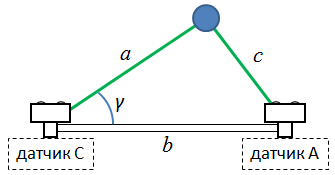
Hi here a couple of link that can be help<br /><br />see  tittle  Sound Level<br /><br /><!-- m --><a class="postlink" href="http://support.robotis.com/en/product/auxdevice/sensor/dxl_ax_s1.htm">http://support.robotis.com/en/product/a ... _ax_s1.htm</a><!-- m --><br /><br /><br />Robot equipped with two US sensors can calculate the exact position of an object,<br /><br /><!-- m --><a class="postlink" href="http://nxttime.wordpress.com/2012/11/25/triangulation-with-two-ultrasonic-sensors/">http://nxttime.wordpress.com/2012/11/25 ... c-sensors/</a><!-- m --><br /><br /> <br />it shows how to use two distance sensors (he used the standard NXT Ultrasonic sensors) can be acceptable accuracy the location of the object. To determine the location is just the method of triangulation. As an experimental set it to the following:<br /><br /><!-- m --><a class="postlink" href="http://nxttime.files.wordpress.com/2012/11/img_8697.jpg">http://nxttime.files.wordpress.com/2012/11/img_8697.jpg</a><!-- m --><br /><br />each of the sensors measuring the distance to an obstacle, should turn to an angle calculated by the formula below. As a result, the part will look like sensors always looking towards the obstacle.<br /><br /><img src="http://upload.wikimedia.org/math/3/6/6/36630193028e4ef714b66789b3820619.png" alt="Image" /><br /><br />This formula - a consequence of the cosine theorem <!-- m --><a class="postlink" href="http://en.wikipedia.org/wiki/Law_of_cosines">http://en.wikipedia.org/wiki/Law_of_cosines</a><!-- m --> , as the following illustration will help you better understand the symbols of the formula.<br /><br /><img src="https://lh6.googleusercontent.com/-rlPT5rS-gWs/ULYO0KADUaI/AAAAAAAAE44/bk8nAlpwhlw/s800/triangulation.PNG" alt="Image" /><br /><br />A similar formula can be easily obtained for the other sensor. It should be noted that the motors in a laboratory device installed so no accident - it's a little to simplify the program - in this location they will rotate the sensor exactly the value of the angle, which is determined by a formula. author also share videos that demonstrate that his approach works:<br /><br /><div class='bbmedia' data-url='http://www.youtube.com/watch?v=do2vzlPjbkM' style='margin: 1px; display: inline-block; vertical-align: bottom;'><div style='width: 200px; height: 40px; border: 1px solid #999; display: table-cell; text-align: center; vertical-align: middle; font: 10px/10px Verdana; color: #555; opacity: 0.5;'><a style='color: #105289; text-decoration: none;' href='http://phpbbex.com/' target='_blank'>phpBB</a> &#91;media&#93;</div><script>if (typeof bbmedia == 'undefined') { bbmedia = true; var e = document.createElement('script'); e.async = true; e.src = 'js/bbmedia.js'; var s = document.getElementsByTagName('script')[0]; s.parentNode.insertBefore(e, s); }</script></div>[/quote]<br /> This way good works only for open space.If you have any objects like wall or another robot of soccer's team this is the reason why the system works wrong.Robot receives a lot of reflected US  signals including echo.Thats why the best solution if he operates in the open space or the object should be closer to your robot against of the rest object<p>Statistics: Posted by <a href="http://forum.robosavvy.com/memberlist.php?mode=viewprofile&amp;u=1867">Novice</a> — Fri Jan 25, 2013 6:10 pm</p><hr />
]]></content>
</entry>
<entry>
<author><name><![CDATA[nicolas gomez]]></name></author>
<updated>2013-01-24T23:50:21+01:00</updated>
<published>2013-01-24T23:50:21+01:00</published>
<id>http://forum.robosavvy.com/viewtopic.php?t=9045&amp;p=37044#p37044</id>
<link href="http://forum.robosavvy.com/viewtopic.php?t=9045&amp;p=37044#p37044"/>
<title type="html"><![CDATA[Project]]></title>

<content type="html" xml:base="http://forum.robosavvy.com/viewtopic.php?t=9045&amp;p=37044#p37044"><![CDATA[
<blockquote><div><cite>Evagorou wrote:</cite><br />Yes ultrasonic is a good idea but i am not sure if i can do that. I will try to find some datasheets for AX-S1 sensor to see what is going on with frequency.<br /><br />Thank you<br />Andreas<br /></div></blockquote><br /><br />Hi here a couple of link that can be help<br /><br />see  tittle  Sound Level<br /><br /><!-- m --><a class="postlink" href="http://support.robotis.com/en/product/auxdevice/sensor/dxl_ax_s1.htm">http://support.robotis.com/en/product/a ... _ax_s1.htm</a><!-- m --><br /><br /><br />Robot equipped with two US sensors can calculate the exact position of an object,<br /><br /><!-- m --><a class="postlink" href="http://nxttime.wordpress.com/2012/11/25/triangulation-with-two-ultrasonic-sensors/">http://nxttime.wordpress.com/2012/11/25 ... c-sensors/</a><!-- m --><br /><br /> <br />it shows how to use two distance sensors (he used the standard NXT Ultrasonic sensors) can be acceptable accuracy the location of the object. To determine the location is just the method of triangulation. As an experimental set it to the following:<br /><br /><!-- m --><a class="postlink" href="http://nxttime.files.wordpress.com/2012/11/img_8697.jpg">http://nxttime.files.wordpress.com/2012/11/img_8697.jpg</a><!-- m --><br /><br />each of the sensors measuring the distance to an obstacle, should turn to an angle calculated by the formula below. As a result, the part will look like sensors always looking towards the obstacle.<br /><br /><img src="http://upload.wikimedia.org/math/3/6/6/36630193028e4ef714b66789b3820619.png" alt="Image" /><br /><br />This formula - a consequence of the cosine theorem <!-- m --><a class="postlink" href="http://en.wikipedia.org/wiki/Law_of_cosines">http://en.wikipedia.org/wiki/Law_of_cosines</a><!-- m --> , as the following illustration will help you better understand the symbols of the formula.<br /><br /><img src="https://lh6.googleusercontent.com/-rlPT5rS-gWs/ULYO0KADUaI/AAAAAAAAE44/bk8nAlpwhlw/s800/triangulation.PNG" alt="Image" /><br /><br />A similar formula can be easily obtained for the other sensor. It should be noted that the motors in a laboratory device installed so no accident - it's a little to simplify the program - in this location they will rotate the sensor exactly the value of the angle, which is determined by a formula. author also share videos that demonstrate that his approach works:<br /><br /><div class='bbmedia' data-url='http://www.youtube.com/watch?v=do2vzlPjbkM' style='margin: 1px; display: inline-block; vertical-align: bottom;'><div style='width: 200px; height: 40px; border: 1px solid #999; display: table-cell; text-align: center; vertical-align: middle; font: 10px/10px Verdana; color: #555; opacity: 0.5;'><a style='color: #105289; text-decoration: none;' href='http://phpbbex.com/' target='_blank'>phpBB</a> &#91;media&#93;</div><script>if (typeof bbmedia == 'undefined') { bbmedia = true; var e = document.createElement('script'); e.async = true; e.src = 'js/bbmedia.js'; var s = document.getElementsByTagName('script')[0]; s.parentNode.insertBefore(e, s); }</script></div><p>Statistics: Posted by <a href="http://forum.robosavvy.com/memberlist.php?mode=viewprofile&amp;u=1610">nicolas gomez</a> — Thu Jan 24, 2013 11:50 pm</p><hr />
]]></content>
</entry>
<entry>
<author><name><![CDATA[Evagorou]]></name></author>
<updated>2013-01-28T20:45:40+01:00</updated>
<published>2013-01-24T23:07:20+01:00</published>
<id>http://forum.robosavvy.com/viewtopic.php?t=9045&amp;p=37043#p37043</id>
<link href="http://forum.robosavvy.com/viewtopic.php?t=9045&amp;p=37043#p37043"/>
<title type="html"><![CDATA[Project]]></title>

<content type="html" xml:base="http://forum.robosavvy.com/viewtopic.php?t=9045&amp;p=37043#p37043"><![CDATA[
Yes ultrasonic is a good idea but i am not sure if i can do that. I will try to find some datasheets for AX-S1 sensor to see what is going on with frequency.<br /><br />Thank you<p>Statistics: Posted by <a href="http://forum.robosavvy.com/memberlist.php?mode=viewprofile&amp;u=3673">Evagorou</a> — Thu Jan 24, 2013 11:07 pm</p><hr />
]]></content>
</entry>
<entry>
<author><name><![CDATA[PedroR]]></name></author>
<updated>2013-01-24T13:40:41+01:00</updated>
<published>2013-01-24T13:40:41+01:00</published>
<id>http://forum.robosavvy.com/viewtopic.php?t=9045&amp;p=37039#p37039</id>
<link href="http://forum.robosavvy.com/viewtopic.php?t=9045&amp;p=37039#p37039"/>
<title type="html"><![CDATA[Project]]></title>

<content type="html" xml:base="http://forum.robosavvy.com/viewtopic.php?t=9045&amp;p=37039#p37039"><![CDATA[
Again, I'm not too familiar with this technique but, as far as I understand, ambient noise has a significant impact on the calibration and readings.<br /><br />That's why Ultrasonic sensors are often used: because unless you have a bat around or other devices producing ultrasonic noises, they usually operate on sound frequencies that are not &quot;crowded&quot;.<br /><br />As I said I am not familiar with the specifics of this technology at all, but I would suggest investigating these potential issues.<br /><br />Following the example of the Ultrasonic sensors, you might want to use a ball emitting at a specific frequency and calibrating the sensors for it (if that's at all possible; I wouldn't know)<br /><br />Kind Regards<br />Pedro.<p>Statistics: Posted by <a href="http://forum.robosavvy.com/memberlist.php?mode=viewprofile&amp;u=1061">PedroR</a> — Thu Jan 24, 2013 1:40 pm</p><hr />
]]></content>
</entry>
<entry>
<author><name><![CDATA[Evagorou]]></name></author>
<updated>2013-01-28T20:48:31+01:00</updated>
<published>2013-01-23T20:32:52+01:00</published>
<id>http://forum.robosavvy.com/viewtopic.php?t=9045&amp;p=37026#p37026</id>
<link href="http://forum.robosavvy.com/viewtopic.php?t=9045&amp;p=37026#p37026"/>
<title type="html"><![CDATA[Project]]></title>

<content type="html" xml:base="http://forum.robosavvy.com/viewtopic.php?t=9045&amp;p=37026#p37026"><![CDATA[
Hi Pedro<br /><br />Thank you for your reply. Yes you are right that i need more sensors to do that idea. It's the same idea that you have told me about the readings. My problem now is how i can be accurate enough to kick the ball precise. I am thinking to use that idea below : Let's say that the robot have to be 5cm away from the ball to kick it properly. I will measure the sound at that specific spot (it will be the max sound ) and via roboplus i can give a command which saying when you detect the max sound,  stop and then kick .Of course i have to test it first and see how accurate it is.<br />I try to copy the link for rhe manual but i can't.<p>Statistics: Posted by <a href="http://forum.robosavvy.com/memberlist.php?mode=viewprofile&amp;u=3673">Evagorou</a> — Wed Jan 23, 2013 8:32 pm</p><hr />
]]></content>
</entry>
<entry>
<author><name><![CDATA[PedroR]]></name></author>
<updated>2013-01-23T16:50:07+01:00</updated>
<published>2013-01-23T16:50:07+01:00</published>
<id>http://forum.robosavvy.com/viewtopic.php?t=9045&amp;p=37025#p37025</id>
<link href="http://forum.robosavvy.com/viewtopic.php?t=9045&amp;p=37025#p37025"/>
<title type="html"><![CDATA[Project]]></title>

<content type="html" xml:base="http://forum.robosavvy.com/viewtopic.php?t=9045&amp;p=37025#p37025"><![CDATA[
Hi Evanguru<br /><br />I'm not too familiar with Sound localization but as far as I understand for this to be possible you'd need multiple sound sensors located around the Robot's head.<br /><br />Then, depending on which one has the highest readings you turn towards the source of sound.<br /><br />afaik the Bioloid only has 1 sound sensor. In the PREMIUM kit, it is possible to add analogue sensors to the A/D ports and read them in Roboplus (it has 5, 2 are used by the Gyro).<br /><br />You may want to google and read some more about sound localization.<br /><br />Regards<br />Pedro.<p>Statistics: Posted by <a href="http://forum.robosavvy.com/memberlist.php?mode=viewprofile&amp;u=1061">PedroR</a> — Wed Jan 23, 2013 4:50 pm</p><hr />
]]></content>
</entry>
<entry>
<author><name><![CDATA[Evagorou]]></name></author>
<updated>2013-01-28T20:42:31+01:00</updated>
<published>2013-01-21T18:54:41+01:00</published>
<id>http://forum.robosavvy.com/viewtopic.php?t=9045&amp;p=37009#p37009</id>
<link href="http://forum.robosavvy.com/viewtopic.php?t=9045&amp;p=37009#p37009"/>
<title type="html"><![CDATA[Project]]></title>

<content type="html" xml:base="http://forum.robosavvy.com/viewtopic.php?t=9045&amp;p=37009#p37009"><![CDATA[
Hi all<br /> I am a new member on this site and beginner at robotics.<br />I am using the bioloid kit and i have to make the robot to locate the ball and kick it. I came up with the idea of not using camera at all, just the sensor AX-S1 to measures the sound and moves towards the ball (noisy ball). I am thinking the use of roboplus but i am not sure if i will implement this idea right. Any ideas of how i will move on with this project?<br /><br />Thank you.<p>Statistics: Posted by <a href="http://forum.robosavvy.com/memberlist.php?mode=viewprofile&amp;u=3673">Evagorou</a> — Mon Jan 21, 2013 6:54 pm</p><hr />
]]></content>
</entry>
</feed>